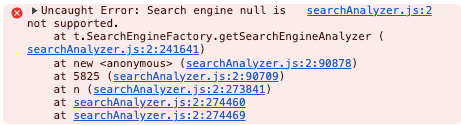
Everytime I run student javascript apps in Chrome with the debugger on (I’m using a Max) recently I get this error in the console:
Uncaught Error: Search engine null is not supported.
at t.SearchEngineFactory.getSearchEngineAnalyzer (searchAnalyzer.js:2:241641)
at new (searchAnalyzer.js:2:90878)
at 5825 (searchAnalyzer.js:2:90709)
at n (searchAnalyzer.js:2:273841)
at searchAnalyzer.js:2:274460
at searchAnalyzer.js:2:274469
It may trigger something about your environment that is causing this error. Definitely looks like a search extension is not setup correctly on that specific device. I assume you meant MAC with Chrome. Is it happening on other equipment?
Do you have any idea what part of your javascript is triggering this error. Does Inspector provide tracing references to your code?
And what do you mean by Student Javascript Apps? As opposed to other Apps? Or do you mean any App?
Sorry - Max is Mac. Student apps are apps created by students in my class using Appstudio and javascript.
I searched SearchEngineFactory.getSearchEngineAnalyzer and other variations of the error message.
Here is the actual message - it always appears now when I run a project, any project, in Appstudio. I am using Chrome 145.0.7632.76. I reinstalled Appstudio. No change. Happens with small projects with one simple form to larger ones. I haven’t identified a common thread. Thoughts?