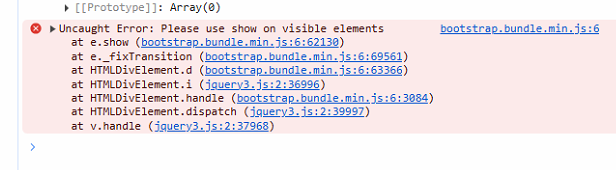
Buttons disappearing

I’m having buttons disappear with the error

I use them with the extra header
<link rel="stylesheet" href="https://cdn.jsdelivr.net/npm/bootstrap-icons@1.11.3/font/bootstrap-icons.min.css">

from this website
https://icons.getbootstrap.com/

I can’t understand what is really happening as I can’t identify a trigger.

Cheers

Can you send a minimal project which shows this? A project with a single button would be best.

Happy to, but I don’t know how to trigger the error. It just happens at different times, although always on a mouseover event, but not every mouseover.

I think I’ve seen something like this before, but I don’t think the extra icons were needed to make the problem happen.

If you remove the extra header, does the problem still happen?

If i removve the header the icons dissappear.
Im using <i class=xxx></i> in thec button value. Is there a better way?
And im using the icons inline in labels too. I can change that if need be.

So if you remove the icons, the buttons do not appear? Can you put some text on the buttons and see if mouseover still causes the error?

The icons are in the .value property eg <i class="bi bi-pencil-square"></i>
Nothing in the ‘icon’ property.
I have no problem when a button only has text.
The buttons are there most of the time, just every so often on a mouseover event, that individual button will throw the error and hide. It can be brought back with .show() ok.
Is there a better way of using those icons?