I have a html file I like to use in appstudio.htmlview1_onchange.innerHTML=…., doesn’t work.uncaught syntax error:unexpected token ‘<‘.line 13977 column 1.i put it in code file,with JavaScript end JavaScript.same err .anyone,please help,tst
What is line 13977? In your code?
commented <!DOCTYPE html><html> .so the line now is <head> in the codefile.
Still waiting for a reply,hoping so …
I don’t have a real answer, but my usual practice with similar items is to create an HTML element and then copy the “body” part of the the html file into that element. If there are styles I need, I put then into the CSS for the app.
Can u code a rough eg.thanks in advance,tst
There’s actually no “code” I normally create a HTMLElement on some form, mark it hidden, and paste the body of my html file into the source item.
When I want to show it, I “show” the element.
This assumes the HTML file is already available at design time.
Hi,sorry,I don’t get it.what do u mean by hidden and show.in my code ,once it detect <>,it flag an error.do u refer html element as html view control?
Best rdgs,tst
Would u mind capture screen of what u mention n show us here so that we could have a better understanding…thanks in advance,tst
I think using an external file as an elements .innerHTML source may cause complications.
Rather than using an external file, can you do something like this in your code window (as an example)?
const htmlSource = “<h1>My HTML Source</h1>“;
htmlview1.innerHTML = htmlSource;
Thanks for your info,will try when I reached home tonight…best rdgs,tst
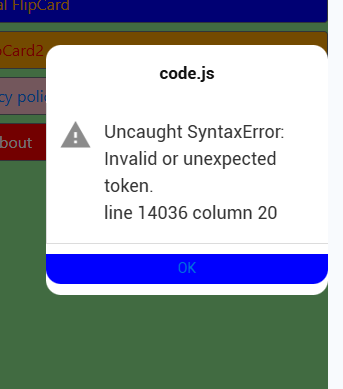
Can you show your full code?
1 Like
JavaScript
const htmlSource = "
<!DOCTYPE html>
<html>
<head>
    <title>Memory Sequence Game</title>
    <style>
        .button-grid { display: grid; grid-template-columns: repeat(4, 80px); gap: 10px; margin-top: 20px; }
        button { height: 80px; font-size: 20px; cursor: pointer; }
        #display { font-size: 24px; font-weight: bold; color: blue; min-height: 30px; }
    </style>
</head>
<body>

    <h2>Sequence Game</h2>
    <div id="display">Press Start to Begin</div>

    <div class="button-grid">
        <button onclick="handleInput(0)">0</button>
        <button onclick="handleInput(1)">1</button>
        <button onclick="handleInput(2)">2</button>
        <button onclick="handleInput(3)">3</button>
        <button onclick="handleInput(4)">4</button>
        <button onclick="handleInput(5)">5</button>
        <button onclick="handleInput(6)">6</button>
        <button onclick="handleInput(7)">7</button>
    </div>

    <br>
    <button onclick="startGame()" style="height: 40px; width: 100px; background: #e0e0e0;">START</button>

<script>
    let secretCode = [];
    let currentLevel = 1; // How many numbers to show
    let userStep = 0;     // Which number in the sequence the user is on
    let isDisplaying = false;

    // 1. Initialize 20 random variables (0 to 7)
    function startGame() {
        secretCode = Array.from({length: 20}, () => Math.floor(Math.random() * 8));
        currentLevel = 1;
        userStep = 0;
        showSequence();
    }

    // 2. Display the code with delays
    async function showSequence() {
        isDisplaying = true;
        const displayDiv = document.getElementById('display');

        for (let i = 0; i < currentLevel; i++) {
            displayDiv.innerText = `Code: ${secretCode[i]}`;
            await new Promise(resolve => setTimeout(resolve, 800)); // Delay
            displayDiv.innerText = "";
            await new Promise(resolve => setTimeout(resolve, 200)); // Short gap
        }

        displayDiv.innerText = "Your Turn!";
        isDisplaying = false;
        userStep = 0;
    }

    // 3. Handle user clicks
    function handleInput(num) {
        if (isDisplaying || secretCode.length === 0) return;

        if (num === secretCode[userStep]) {
            // Correct hit
            userStep++;

            // Check if user finished the current sequence
            if (userStep === currentLevel) {
                if (currentLevel === 20) {
                    document.getElementById('display').innerText = "YOU WIN! Perfect Memory.";
                } else {
                    document.getElementById('display').innerText = "Correct! Next level...";
                    currentLevel++;
                    setTimeout(showSequence, 1000);
                }
            }
        } else {
            // Wrong hit
            document.getElementById('display').innerText = "WRONG! Game Over. Press Start.";
            secretCode = [];
        }
    }
</script>

</body>
</html>
"
End JavaScript


'Function Form412.onshow()

'HTMLview1.innerHTML = htmlSource

'End Function
JavaScript
Form412.onshow = Function () {
  HTMLview1.innerHTML = htmlSource;
};
End JavaScript
You need to move the contents of the script tag out of the HTML element and into your code, presumably wrapped in a “javascript” section.
It looks like you need to remove the , javascript and style code out of your htmlSource.
Try this,
Const htmlSource = "

<div>
    <title>Memory Sequence Game</title>
</div>

<div>

    <h2>Sequence Game</h2>
    <div id='display' style='font-size: 24px; font-weight: bold; color: blue; min-height: 30px;'>Press Start to Begin</div>

    <div class='button-grid' style='display: grid; grid-template-columns: repeat(4, 80px); gap: 10px; margin-top: 20px;'>
        <button style='height: 80px; font-size: 20px; cursor: pointer; ' onclick='handleInput(0)'>0</button>
        <button style='height: 80px; font-size: 20px; cursor: pointer; '  onclick='handleInput(1)'>1</button>
        <button style='height: 80px; font-size: 20px; cursor: pointer; '  onclick='handleInput(2)'>2</button>
        <button style='height: 80px; font-size: 20px; cursor: pointer; '  onclick='handleInput(3)'>3</button>
        <button style='height: 80px; font-size: 20px; cursor: pointer; '  onclick='handleInput(4)'>4</button>
        <button style='height: 80px; font-size: 20px; cursor: pointer; '  onclick='handleInput(5)'>5</button>
        <button style='height: 80px; font-size: 20px; cursor: pointer; '  onclick='handleInput(6)'>6</button>
        <button style='height: 80px; font-size: 20px; cursor: pointer; '  onclick='handleInput(7)'>7</button>
    </div>

    <br>
    <button onclick='startGame()' style='height: 40px; width: 100px; background: #e0e0e0;'>START</button>

</div>
"


Function Form412.onshow()

  HTMLview1.innerHTML = htmlSource

End Function

JavaScript
Form412.onshow = Function () {
  HTMLview1.innerHTML = htmlSource;
};

 let secretCode = [];
    let currentLevel = 1; // How many numbers to show
    let userStep = 0;     // Which number in the sequence the user is on
    let isDisplaying = false;

    // 1. Initialize 20 random variables (0 to 7)
    function startGame() {
        secretCode = Array.from({length: 20}, () => Math.floor(Math.random() * 8));
        currentLevel = 1;
        userStep = 0;
        showSequence();
    }

    // 2. Display the code with delays
    async function showSequence() {
        isDisplaying = true;
        const displayDiv = document.getElementById('display');

        for (let i = 0; i < currentLevel; i++) {
            displayDiv.innerText = `Code: ${secretCode[i]}`;
            await new Promise(resolve => setTimeout(resolve, 800)); // Delay
            displayDiv.innerText = "";
            await new Promise(resolve => setTimeout(resolve, 200)); // Short gap
        }

        displayDiv.innerText = "Your Turn!";
        isDisplaying = false;
        userStep = 0;
    }

    // 3. Handle user clicks
    function handleInput(num) {
        if (isDisplaying || secretCode.length === 0) return;

        if (num === secretCode[userStep]) {
            // Correct hit
            userStep++;

            // Check if user finished the current sequence
            if (userStep === currentLevel) {
                if (currentLevel === 20) {
                    document.getElementById('display').innerText = "YOU WIN! Perfect Memory.";
                } else {
                    document.getElementById('display').innerText = "Correct! Next level...";
                    currentLevel++;
                    setTimeout(showSequence, 1000);
                }
            }
        } else {
            // Wrong hit
            document.getElementById('display').innerText = "WRONG! Game Over. Press Start.";
            secretCode = [];
        }
    }


End JavaScript
Try @slm advice,same err.
Try @Pro_Certs advice,same err,but err now at column 18,at ".the const has been changed to var
Anyway,frankly speaking,this html chunk don’t bother with me anymore.i just wanted to learn a new skill.this html is from gemini.i already altered my own code successfully working well.it is so blessed to have two person helping me.it is a warm sensation.thanks @slm,thanks @Pro_Certs,best rdgs,tst