Hi everyone
have a question:
Why doesn’t the same sound appear on the PC and the Handy?
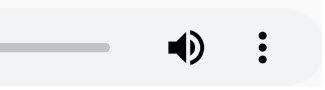
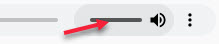
the volume control is displayed on the PC and not on the Hany (see pictures).
someone an idea
Hi everyone
have a question:
Why doesn’t the same sound appear on the PC and the Handy?
the volume control is displayed on the PC and not on the Hany (see pictures).
someone an idea
Which control are you using?
Das von “Multimedia” “Audio”

That’s built into the browser - it isn’t under AppStudio’s control.
And I don’t get a volume control with that control under Windows 10 with Chrome nor on Android latest and iOS latest. If you do figure out a volume control for audio (or video), please let us know.
it is “Multimedia” and “audio” 
and this parameter 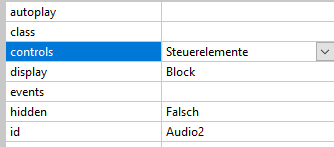
Chrome Version 84.0.4147.125
I found no solution with this audio control. Maybe this MediaElement.js file is worth a try. There indeed a volume control is visible and working. Quote:
Ìf you are looking to create your own HTML audio player, the best option would be to leave off the control attribute and implement your own controls using JavaScript.

Advanced Audio Player Using MediaElement.js
As shown above, CSS styling options for <audio> are very limited. Fortunately, an amazing open-source media framework named MediaElement.js allows you to have much more control on your audio elements.


``Hallo Bernd
Ein grosser DANK für deine Bemühungen. Du warst fleissig!
Ich kommen mit der “Case” Bedingung nicht zurecht bei der Dia-Show!
Vielleicht kannst Du mein Programm einmal anschauen und Du hast die Lösung (siehe Anhang).
Es geht um folgendes:
Vielleicht hast Du eine Idee!
Zum Voraus schon mal besten Dank
Lieber Gruss Hans
(Attachment Schmetterlinge.zip is missing)
Gern. Anhang vergessen?
Nein, aber die Datei war zu gross. Sende sie Dir auf einem anderen weg!
Schmetterlinge seems to be another topic. I would comment there. But I think this is solved already when you put butterfly name in a var and let the function use this var.